How to transfer internet without overspending on your move
Madeline Gearheart
Sep 29, 2026
To transfer internet without paying more than necessary, start by checking availability at your new address, comparing total costs, and coordinating your start and cancellation dates. Careful timing may help you limit overlapping bills, setup charges, and equipment fees.
Moving already comes with plenty of expenses. Internet service may not be the biggest one, but missed cancellation dates, equipment mistakes, and poorly timed installations can add costs you didn’t plan for.
The good news is that you don’t have to manage every detail at once. Whether you need Frontier Internet transfer service, plan to move in the next few weeks or months, or are simply thinking about a future move, a few well-timed decisions can make the process more manageable.
This guide explains how to transfer internet when moving, what expenses to watch for, and when to complete each step.
Internet moving costs to plan for
Before you decide when to schedule, transfer, or cancel service, it helps to see where various internet costs enter the moving process. Some arise when starting service at your new home, others come with closing your old account, and a few can result from the period if/when both plans are active.
Not every cost will apply to you, and the amounts will always depend on your plan, contract, equipment, and address. Still, knowing what to look out for now will make the timing recommendations throughout this guide easier to understand—and help you make each decision with its possible cost in mind.
Potential cost
When it may arise
What to verify
Overlapping service bills
Your old and new internet plans are active at the same time
Billing cycles and service start and end dates
Installation or activation charges
Your new or transferred service requires setup
Current offers, installation options, and provider policies
Equipment return penalties
Old equipment is returned late or incorrectly
Return deadlines, included parts, shipping provider, and tracking details
New equipment charges
You rent equipment with your new or transferred service
Monthly rental costs, router transfer instructions
Early-termination charges
You cancel service before a contract or commitment ends
Contract dates and applicable cancellation terms
Appointment-related charges
You miss, cancel, or reschedule an installation
Provider appointment policies
Higher plan costs
Your current rate or promotion does not transfer to the new address
Promotional terms and the standard monthly price
How to transfer internet in four steps
The process of transferring internet comes down to four steps: check availability, choose a plan, schedule service, and cancel your old service if necessary. What varies is when and how you complete those steps.
Current Frontier customers should ask Frontier to move an existing account, while other movers will order service from a new provider and separately close their old account. This section covers the what and the how; the next section explains the when.
1. Check availability
Internet plans vary from state to state, city to city, and address to address, sometimes even from the same provider. Save yourself time and potential disappointment by checking ZIP codes and addresses before you get your heart set on a certain internet plan. Hoping to transfer Frontier Internet specifically? Start your Frontier move with an availability check.
2. Choose or confirm your plan
As your move date approaches, narrow down your plan options based on speed, monthly price, equipment, and anything else you value. Then hop online or call your new provider to order service.
Existing Frontier customers using the Frontier Internet transfer service can work this step backward to save time. When you call or chat Frontier to arrange your move, first ask whether your current plan will transfer to the new address—that way, you only have to shop if it doesn’t.
3. Schedule service at your new home
Have a service start date in mind that balances cost with your need for reliable access. As part of the order process or Frontier Internet transfer service, you’ll select an installation or activation date from available options. If you’re switching providers, leaving a few days of overlap with your old service may increase your moving costs, but it can provide useful flexibility if you work or study from home.
4. Cancel your old service if needed
If you transfer Frontier Internet, you probably won’t need to submit a separate cancellation request, but you may need to select a date to shut off service at the old address.
If you’re switching providers, once you confirm your installation details, schedule cancellation with your old provider. Before closing your account, verify the service shutoff and final billing date, possible early-termination charges, and equipment-return instructions so an attempt to transfer internet does not lead to unexpected costs.
Your internet moving timeline
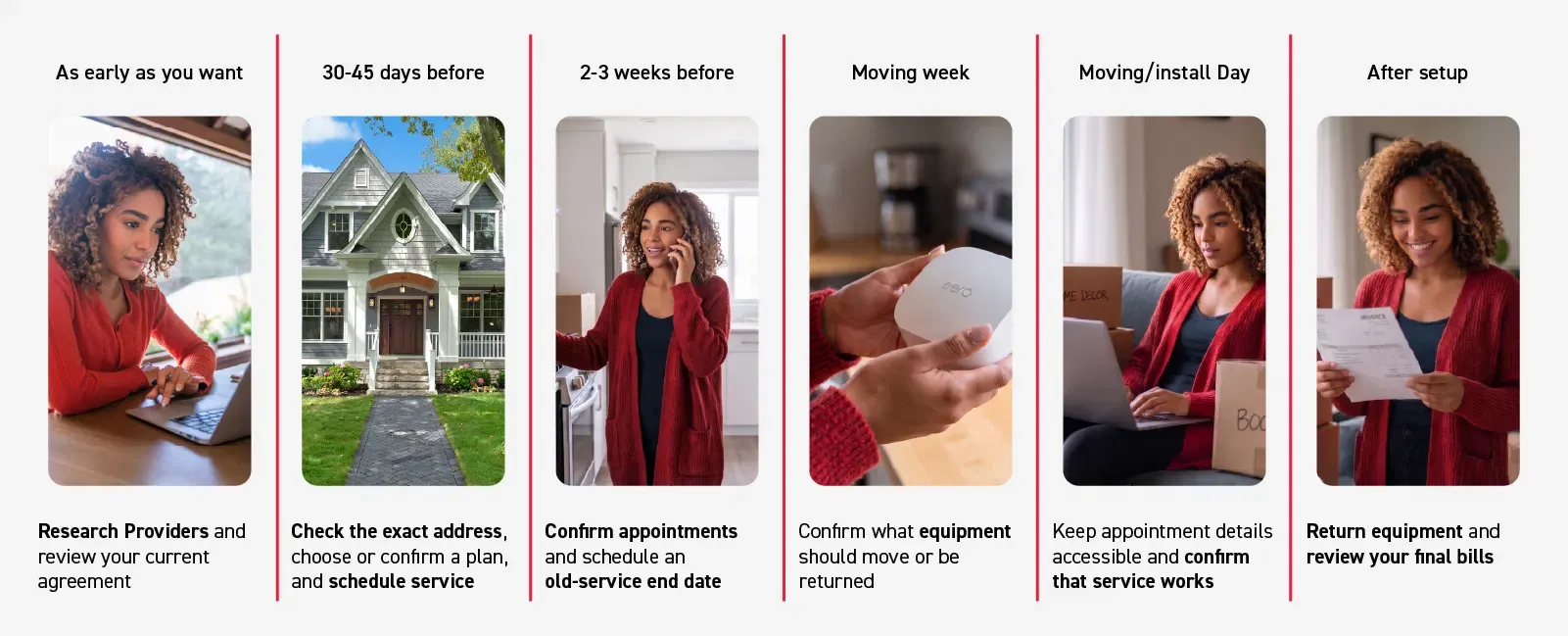
Knowing how to move your internet service is only half of the plan. When you complete each step can affect whether you end up paying for overlapping services, get an install appointment on the date you want, and return equipment on time. The following timeline explains when to research, schedule, cancel, and follow up as you transfer internet to your next home.
As early as you want
The moment a potential move appears on your horizon, you can begin your research, especially if internet availability could influence where you live.
Check providers in the states, cities, neighborhoods, or ZIP codes you’re considering, but remember that these early results don’t guarantee what will be available when you finally get an exact address and move date. If you hope to transfer Frontier Internet to your next area, confirm that Frontier serves at least some of the areas on your list before you get too far into your search.
This is also a good time to review your current internet agreement for contract dates, cancellation terms, and closing charges.
30–45 days before the move
Once you know your new address and moving date, shift from research to action. Contact your provider to confirm exact plan availability and schedule installation or activation at your new home. Waiting until 30–45 days before your move gives you more accurate availability results than if you tried to order earlier, yet still leaves plenty of time to complete the other transfer steps before moving day.
2–3 weeks before the move
With the new service scheduled, focus on coordinating the two addresses. Confirm the installation date, arrival window, and any access requirements, then decide when to end the old connection.
If you transfer Frontier Internet, verify that the move order includes the correct start and stop dates. If you’re switching providers, contact the old company separately to cancel service. A few careful questions may help you avoid paying for a longer overlap than you need—or canceling so early that you lose service before moving:
What date can I stop service?
Will the final month be prorated?
Will an early-termination fee apply?
Which equipment must be returned, when, and how?
Moving week
As the move gets closer, equipment becomes the priority. Current Frontier customers should follow the instructions provided with their Frontier Internet transfer service order, because you may get a new router. If you’re switching providers, make sure you pack the right devices, power cords, and accessories in your equipment return and send it back exactly per provider instructions, saving tracking numbers or receipts for your records.
Moving/install day
Screenshot or star any emails/documentation with your order number, appointment details, account credentials, and customer support details so they’ll be easy to find. If you’re getting professional installation, make sure an authorized adult is at home to provide access to your living space and any required utility areas.
After setup
Once your new connection is active, monitor internet performance over the next few days and contact customer service if you run into any issues. Plus, watch for the final bill from your previous provider so you can check for unexpected equipment, termination, or other service charges. Current Frontier customers should also check that the Frontier Internet transfer service ended billing at the old address as requested.
Internet moving timeline at a glance
The moving process is best completed at the following intervals on your moving timeline. This table summarizes when to complete the main tasks and which costs deserve the most attention.
Moving stage
What to do
Costs to watch
As early as you want
Research providers and review your current agreement
Early-termination charges and different plan prices
30–45 days before
Check the exact address, choose or confirm a plan, and schedule service
Installation, activation, equipment, and promotional pricing
2–3 weeks before
Confirm appointments and schedule an old-service end date
Overlapping bills and appointment charges
Moving week
Confirm what equipment should move or be returned
Equipment replacement and unreturned-equipment fees
Moving/install day
Keep appointment details accessible and confirm that service works
Missed appointments and temporary connection costs
After setup
Return equipment and review your final bills
Unreturned-equipment charges and billing errors
What to compare at your next address
If you can’t get Frontier at your new address, you’ll need to shop for a new provider. As always, remember to look for more than just a flashy sticker price. A low introductory rate can be helpful, but it doesn’t reflect the entire cost of starting over.
To keep moving costs down, compare services near you based on factors that will affect both your move and your monthly budget:
Plan performance. Compare not just download speeds, but also upload speeds, reliability, and data limits, so you get the most value for what you pay.
Monthly costs plus fees. Calculate rates with any required equipment or other fees factored in.
Total starting costs. Note installation/activation fees, deposits, or upfront equipment costs.
Long-term costs. Check how long your signup rate lasts and how much the price increases afterward.
Commitments. Review contract lengths and early-termination terms and fees.
Installation logistics. Ask about installation options, typical wait times, and cancellation policies.
Transferring Frontier Internet service
Frequently asked questions
Can I transfer my Frontier Internet service to a new address?
You may be able to transfer Frontier Internet if service is available at your new address. Chat about your move or call 1-800-921-8101 to check availability and learn more about plans, pricing, and installation where you’re headed next.
Can I take my Frontier router with me when I move?
You might be able to, but you should confirm before packing any equipment. Start your Frontier move here and get specific instructions on which devices, cords, and accessories should move with you and which should be returned.
What happens if Frontier isn’t available at my new address?
If Frontier isn’t available at your new address, you’ll need to find a new provider—perhaps Fios or 5G Home Internet from Frontier’s new parent company, Verizon. Whichever service you choose, confirm installation details before you contact Frontier to cancel.
How far in advance should I schedule a Frontier Internet transfer?
Existing customers can schedule Frontier Internet transfer service up to 45 days ahead. Installation appointment availability can vary, so reach out early to increase your chances of getting the installation date you want.
Does Frontier charge a fee to transfer internet service when moving?
There’s no fee specifically to transfer addresses, but moving can incur related costs—for example, if your current plan isn’t available at your new home and you have to choose the next plan up.
To offset moving costs, Frontier currently offers free installation for qualifying moves. Start your Frontier Internet service transfer and check eligibility now.
How much should my old and new internet service overlap?
Most people want to minimize overlap to avoid double service charges. The best time to set your cancellation and activation dates is 30–45 days before your move. Try scheduling cancellation as soon as you know your moveout date and installation as soon as you know your move-in date so you can stay organized, meet return deadlines, and increase the chances of getting your preferred install date.
Should I cancel my current internet service before or after moving?
Usually before. As soon as you know your moveout date, contact your provider and schedule your service-end date so you don’t forget and accrue new/extra charges. Canceling early also gives you more time to return old equipment.
In rare cases, canceling after you move might save you hundreds in cancellation fees or give you much-needed internet access at two residences during a more gradual move. However, as soon as someone moves into your old place, you’ll probably be required to cancel service anyway.
Will my current plan and price transfer to my new address?
It might, but you should always check with your provider. If you’re hoping to transfer Frontier Internet, make that your first question to your Frontier representative.
Make your next connection part of the plan
The right time to transfer internet depends on your address, moving date, billing cycle, and tolerance for overlapping charges vs. a possible service gap. Start researching early, make account changes once your plans are firm, and verify every important cost directly with the provider.
If you already have Frontier, you may be able to carry over your Frontier Fiber account from one address to the next using the Frontier Internet transfer service. Start your Frontier move now.
Hoping to switch to Frontier at your new place? Check Frontier availability today to find symmetrical speeds on a 100% fiber network at your next home.